USDC deposits and withdrawals
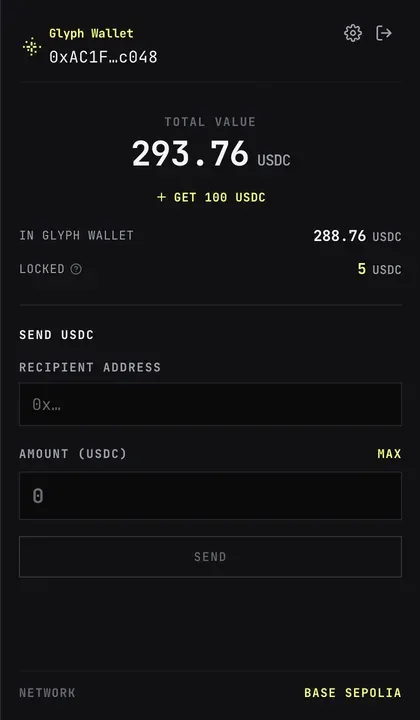
Understand the balances
Section titled “Understand the balances”Open the balance control in the header. Total Value is the sum of two rows:
In Glyph Wallet: everything you can send right now — USDC held directly by theGame Walletplus the withdrawable part of the game deposit.Locked: USDC committed to active matchmaking, Auto Battle, or a joined Room.
Locked funds return to the sendable balance when the matching request ends, Auto Battle stops, or the Room finishes.
Fund the Game Wallet
Section titled “Fund the Game Wallet”On Base:
- Open the wallet panel.
- Select
Fund USDC. - Copy the receive address or use the offered funding method.
- Send Base USDC to that exact Game Wallet address.
You can also select Send USDC later to transfer wallet-held USDC to another Base
address. Check the destination and active network carefully; the transfer cannot
be reversed.
Automatic game deposits
Section titled “Automatic game deposits”There is no manual Deposit button. A paid action calculates how much it needs in the game deposit, reads the current onchain withdrawable balance, and moves only the shortfall from the Game Wallet.
For example, if an action needs 1.05 USDC and 0.40 USDC is already deposited and withdrawable, Glyph deposits 0.65 USDC. The app approves only that exact shortfall instead of leaving an unlimited USDC approval. A success message reports the amount moved before the original game action continues.
If the Game Wallet does not cover the shortfall, the action stops and displays the amount still needed. Fund the Game Wallet and retry the original action.
Automatic withdrawals on send
Section titled “Automatic withdrawals on send”There is no manual Claim button. Send USDC works against the combined sendable
balance. When the amount exceeds the USDC held directly by the Game Wallet, the
entire withdrawable game balance is first withdrawn to the wallet and the
transfer then runs — two transactions execute in order, and the confirmation
dialog says so before you confirm.
Partial withdrawal is not available; the withdrawal always moves the full
withdrawable amount. Locked funds are never withdrawn. End or cancel
matchmaking, wait for Auto Battle to stop, or wait for the Room to finish to
unlock them.
Room prizes and refunds use separate controls in the finished Room. Select
Claim Prize or Claim Refund there first; the received amount then joins the
withdrawable balance.